An official website of the United States government

Here’s how you know

Official websites use .gov
A .gov website belongs to an official government organization in the United States.

Secure .gov websites use HTTPS
A lock ( ) or https:// means you’ve safely connected to the .gov website. Share sensitive information only on official, secure websites.

GSA Logo U.S. General Services Administration
    • Explore buy through us
    • Category management
    • Government property for sale or lease
      Toggle submenu
      • Personal property (tangible goods)
      • Real property (real estate and buildings) for public use
      • Real property sales
      • Vehicle sales
    • Products and services
      Toggle submenu
      • Human capital
      • Industrial products and services
      • Office management
      • Professional services
      • Security and protection
      • Transportation and logistics services
    • Purchasing programs
      Toggle submenu
      • Assisted acquisition
      • Commercial platforms
      • Federal strategic sourcing initiative
      • Fleet management
      • HCaTS and HCaTS SB
      • OASIS and OASIS SB
      • Requisition programs
      • State and local programs
      • Emergency acquisition basic ordering agreements
    • Shared services
      Toggle submenu
      • Payroll services
      • Support services for CABs

    Featured Topics

    • Multiple Award Schedule Governmentwide contracts for products and services at volume discount pricing.
    • Auctions Federal assets available via auction to the general public.
    • Explore sell to government
    • Step 1: Learn about government contracting
      Toggle submenu
      • Ways you can sell to government
      • How to access contract opportunities
      • Conduct market research
    • Step 2: Compete for a contract
      Toggle submenu
      • Register your business
      • Certify as a small business
      • Become a schedule holder
      • Market your business
      • Research active solicitations
      • Respond to a solicitation
      • What to expect during the award process
    • Step 3: Manage your contract
      Toggle submenu
      • Comply with contractual requirements
      • Handle contract modifications
      • Monitor past performance evaluations

    Featured Topics

    • Contract opportunities on SAM.gov Search current federal contract opportunities and procurement notices.
    • Forecast of contracting opportunities Anticipated contracts offered by GSA.
    • Vendor support center Research the federal market, report sales, and upload contract information.
    • Explore real estate
    • Design and construction
      Toggle submenu
      • 3D-4D building information modeling
      • Computer-aided design standards
      • Engineering
      • Project management information system
      • Prospectus thresholds
    • Facilities management
      Toggle submenu
      • Security
      • Tenant services
      • Water quality management
    • Our properties
      Toggle submenu
      • Owned and leased properties
      • Renting property
    • Real estate services
      Toggle submenu
      • Leasing resources
      • Real property disposal
      • Reimbursable services (RWA)
      • For businesses seeking opportunities
      • For workers in federal buildings
      • Voice of the customer
    • Workplace optimization
      Toggle submenu
      • Commercial coworking
      • Space Match
    • Explore historic buildings

    Featured Topics - Real Estate

    • Historic preservation tools and resources Procedures for maintaining and repairing historic buildings.
    • Real property disposal Dispose or acquire excess federal real property including buildings or land.
    • Explore policy and regulations
    • Acquisition policy
    • Aviation management policy
    • Federal Advisory Committee Act management
    • Information technology policy
    • Real property management policy
    • Travel management policy
    • Regulations
      Toggle submenu
      • Federal acquisition regulations
      • Federal management regulations
      • Federal travel regulations

    Featured Topics

    • Forms Search for a government form.
    • Per diem FAQs Frequently asked questions about per diem rates and related topics.
    • Explore small business
    • Small business goals
    • Register your business
      Toggle submenu
      • Explore business models
      • Research the federal market
      • Subcontracting and other partnerships
    • Forecast of contracting opportunities
    • Small business resources
      Toggle submenu
      • Small business contacts
      • Videos

    Featured Topics

    • Forecast tool Information on planned federal contracting opportunities.
    • Socio economic categories Check your eligibility for small-business set-asides.
    • Training resources Suggested training for doing business with us.
    • Explore travel
    • Plan a trip
      Toggle submenu
      • Per diem rates
      • Transportation (airfare rates, POV rates, etc.)
      • Lodging
      • Travel charge card
    • Travel and lodging services
      Toggle submenu
      • E-gov travel service (ETS)
      • Rideshare
      • Travel category schedule
    • Federal travel regulation

    Featured Topics

    • Per diem rates look-up Allowances for lodging, meal and incidental costs while on official government travel.
    • Mileage reimbursement rates Reimbursement rates for the use of your own vehicle while on official government travel.
    • Explore technology
    • Purchasing programs
      Toggle submenu
      • Cloud computing services
      • Cybersecurity products and services
      • Governmentwide acquisition contracts
      • MAS information technology
      • USAccess
    • Government initiatives
      Toggle submenu
      • Artificial Intelligence
      • Cybersecurity
      • Emerging citizen technology
      • FedRAMP
      • Federal identity, credentials, and access management
      • Robotic process automation community
      • Technology modernization fund
    • Training

    Featured Topics

    • Challenge.gov Government sponsored challenges and prize competitions.
    • Data.gov Access U.S. government data.
    • Multiple award schedule IT category Information technology products, services and solutions.
    • Explore about us
    • Background and history
      Toggle submenu
      • Overview
      • Mission and strategic goals
      • Role in presidential transitions
    • Careers
      Toggle submenu
      • Get an internship
      • Launch your career
      • Elevate your professional career
      • Discover special hiring paths
      • Resources and related links
    • Events and training
      Toggle submenu
      • Events, training, and request a speaker
      • Our training programs
    • Newsroom
      Toggle submenu
      • Agency blog
      • Congressional testimony
      • GSA does that podcast
      • News releases
      • Speeches
      • Videos
    • Organization
      Toggle submenu
      • Leadership directory
      • Federal Acquisition Service
      • Public Buildings Service
      • Staff offices
    • Contact us

    Featured Topics

    • Blog Read the latest GSA news, updates and analysis.
    • Careers Learn what we have to offer.
  • Per diem lookup
Buy through us
Explore buy through us
Category management
Government property for sale or lease
Personal property (tangible goods)
Real property (real estate and buildings) for public use
Real property sales
Vehicle sales
Products and services
Human capital
Industrial products and services
Office management
Professional services
Security and protection
Transportation and logistics services
Purchasing programs
Assisted acquisition
Commercial platforms
Federal strategic sourcing initiative
Fleet management
HCaTS and HCaTS SB
OASIS and OASIS SB
Requisition programs
State and local programs
Emergency acquisition basic ordering agreements
Shared services
Payroll services
Support services for CABs
Sell to government
Explore sell to government
Step 1: Learn about government contracting
Ways you can sell to government
How to access contract opportunities
Conduct market research
Step 2: Compete for a contract
Register your business
Certify as a small business
Become a schedule holder
Market your business
Research active solicitations
Respond to a solicitation
What to expect during the award process
Step 3: Manage your contract
Comply with contractual requirements
Handle contract modifications
Monitor past performance evaluations
Real estate
Explore real estate
Design and construction
3D-4D building information modeling
Computer-aided design standards
Engineering
Project management information system
Prospectus thresholds
Facilities management
Security
Tenant services
Water quality management
Our properties
Owned and leased properties
Renting property
Real estate services
Leasing resources
Real property disposal
Reimbursable services (RWA)
For businesses seeking opportunities
For workers in federal buildings
Voice of the customer
Workplace optimization
Commercial coworking
Space Match
Explore historic buildings
Policy and regulations
Explore policy and regulations
Acquisition policy
Aviation management policy
Federal Advisory Committee Act management
Information technology policy
Real property management policy
Travel management policy
Regulations
Federal acquisition regulations
Federal management regulations
Federal travel regulations
Small business
Explore small business
Small business goals
Register your business
Explore business models
Research the federal market
Subcontracting and other partnerships
Forecast of contracting opportunities
Small business resources
Small business contacts
Videos
Travel
Explore travel
Plan a trip
Per diem rates
Transportation (airfare rates, POV rates, etc.)
Lodging
Travel charge card
Travel and lodging services
E-gov travel service (ETS)
Rideshare
Travel category schedule
Federal travel regulation
Technology
Explore technology
Purchasing programs
Cloud computing services
Cybersecurity products and services
Governmentwide acquisition contracts
MAS information technology
USAccess
Government initiatives
Artificial Intelligence
Cybersecurity
Emerging citizen technology
FedRAMP
Federal identity, credentials, and access management
Robotic process automation community
Technology modernization fund
Training
About us
Explore about us
Background and history
Overview
Mission and strategic goals
Role in presidential transitions
Careers
Get an internship
Launch your career
Elevate your professional career
Discover special hiring paths
Resources and related links
Events and training
Events, training, and request a speaker
Our training programs
Newsroom
Agency blog
Congressional testimony
GSA does that podcast
News releases
Speeches
Videos
Organization
Leadership directory
Federal Acquisition Service
Public Buildings Service
Staff offices
Contact us
  1. Home
  2. Buy through us
  3. Shared Services
  4. Support Services for Commissions and Boards
  5. HR Links user guides
  6. Time and leave
  7. Create an absence request (employee)

Create an absence request

All leave requests must be approved by your supervisor.

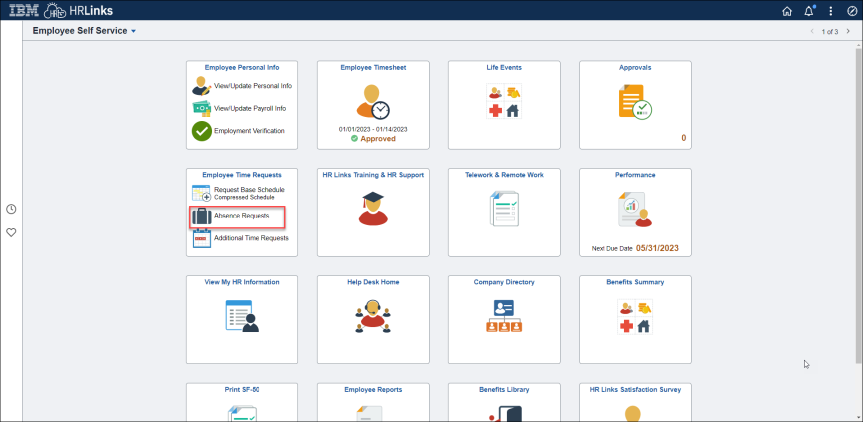
  1. From the Employee Self Service home page, select Absence Requests on the Employee Time Requests tile.

    Create absence request 1
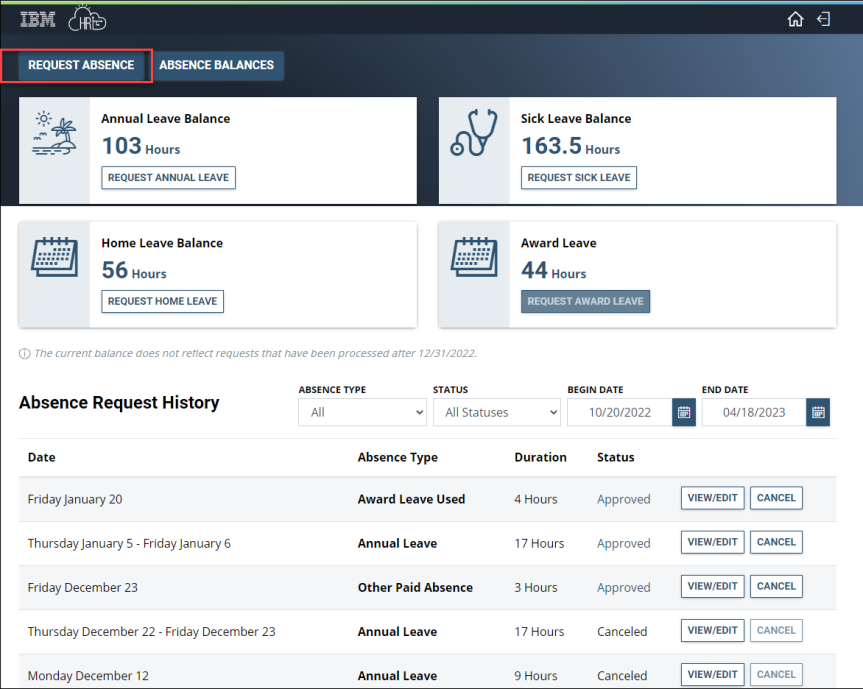
  2. Select Request Absence from the Request Absence page.

    Create absence request 2

    Note: Absence Request History will also be shown on this page. Absence type defaults to All. If you want to see absence request history outside the default date parameters, you can change either the Begin Date or the End Date or both.

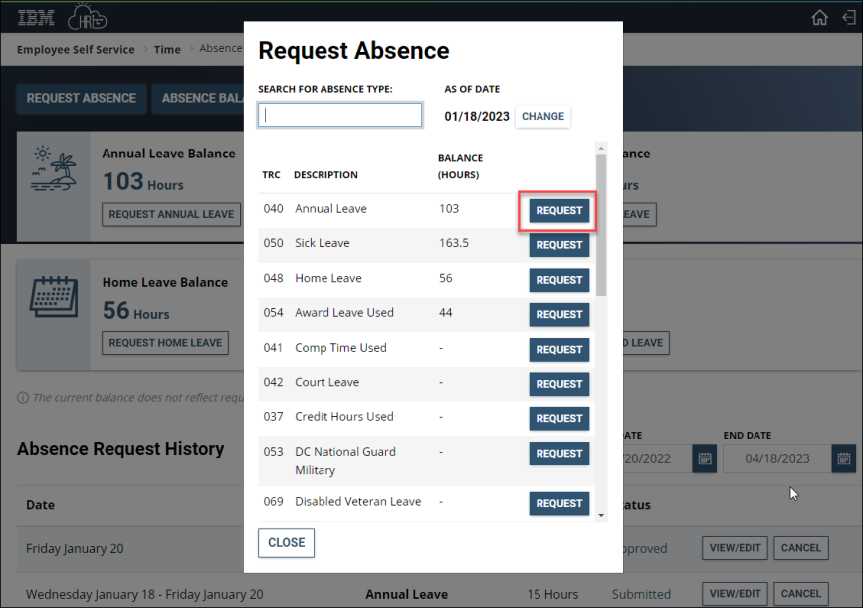
  3. Select the appropriate TRC absence code and select Request.

    Create absence request 3
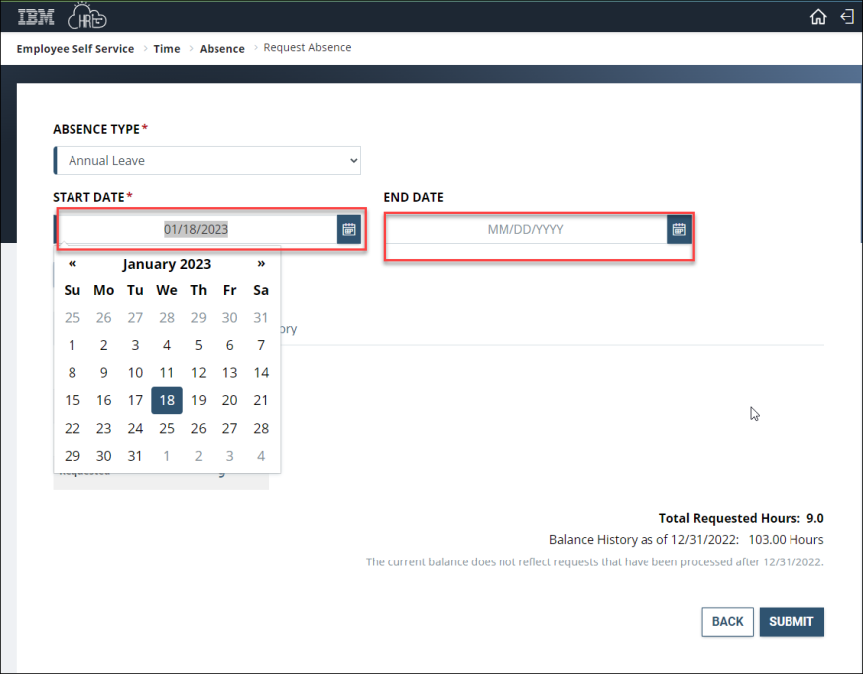
  4. Select the calendar icon to choose the Start Date and End Date or type the Start and End Dates into the corresponding fields.

    Create absence request 4
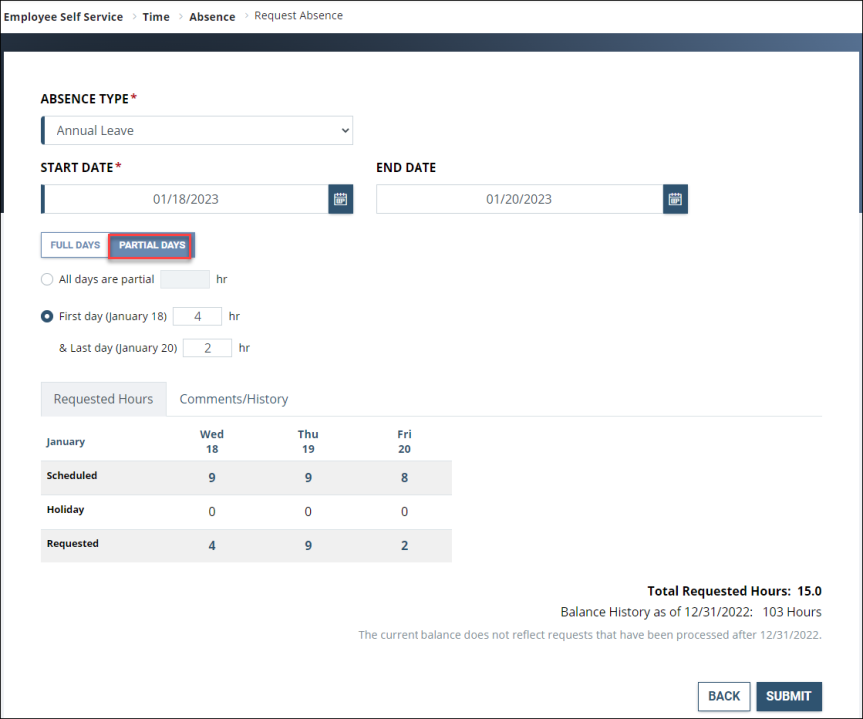
  5. After choosing start and end dates, the absence page defaults to Full Days.

    a. If you are requesting Full Days, simply select the Comments/History hyperlink and add any Comments in the Comments tab as necessary and select Submit. The page will automatically calculate the total requested hours.

    b. If you are submitting a request for Partial Days, select Partial Days, put in the number of hours being requested either for all days or for the first and last day of absence and select Submit. The page will automatically calculate the total requested hours.

    Note: If only the First Day and/or Last Day of the absence will be partial days, a value must be added for each of them. The value 0 is not allowed for these days.

    If selecting All days are partial, the same number of hours must be requested for all days in the period.

    Create absence request 5
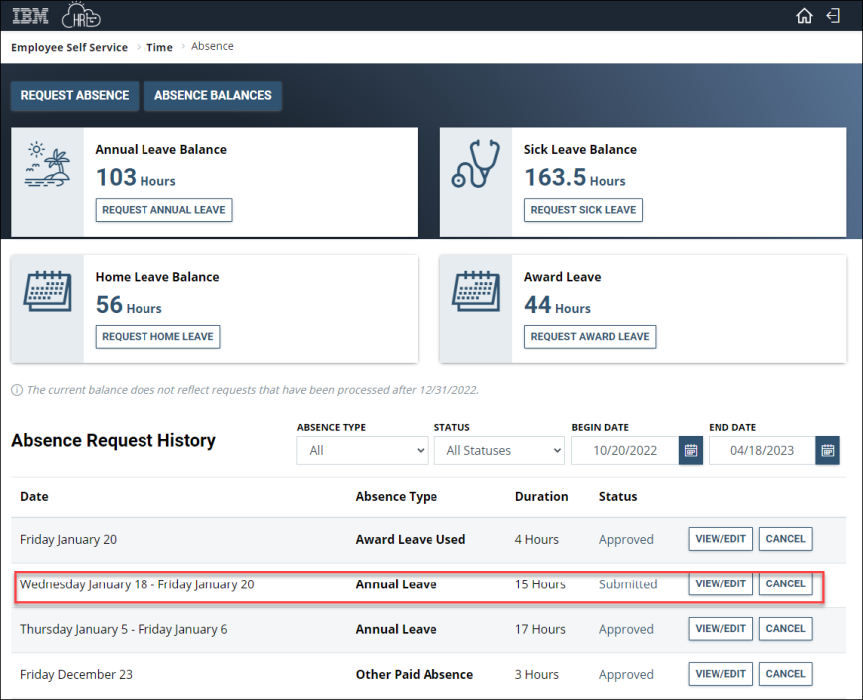
  6. Once the absence request is submitted, you will see the status show up as Submitted.

    Create absence request 6
  7. Once your supervisor approves your absence request, the status will change from Submitted to Approved. Congratulations!

Time Reporting Codes

TRCTitleDefinitionReferences
40Annual LeaveAn employee may use annual leave for vacations, rest and relaxation, and personal business or emergencies.5 USC chapter 63 GSA Order HRM 6010.1A November 2021
50Sick LeaveAn employee may use sick leave for; personal medical needs, family care or bereavement, care of a family member with a serious health condition, adoption related purposes5 USC 6307 5 CFR part 630 subpart D
48Home LeaveIt is earned by service abroad and can be utilized once the employee has completed a one-time requirement of 24 months of continuous service abroad. Home leave is intended for employees to use for return travel back to the U.S., in the Commonwealth of Puerto Rico, or in the territories or possessions of the United States.5 USC 6305(a) 5 CFR 630 - Subpart F
54Award Leave UsedA time–off award is time off from duty, without loss of pay or charge to leave, granted to a Federal employee as a form of incentive or recognition.5 USC 4502(e) 5 CFR 451.104
41Comp Time UsedCompensation for irregular or occasional overtime work with an equal amount of compensatory time off from the employee’s tour of duty instead of monetary payment.GSA Order HRM 6010.1A November 2021 5 USC 5543 5 USC 6123(a)(1) 5 CFR 550.114 5 CFR 551.531
42Court LeaveAn employee is entitled to paid time off without charge to leave for service as a juror or witness.5 USC 6322, 5537, and 5515
37Credit Hours UsedCredit hours are hours that an employee elects to work, with supervisory approval, in excess of the employee’s basic work requirement under a flexible work schedule. For a full-time employee, only 24 credit hours may be carried over to the next pay period. For a part-time employee, not more than one-fourth of the hours in the employee’s biweekly basic work requirement may be carried over to the next pay period.GSA Order HRM 6010.1A November 2021 5 USC chapter 61 5 CFR part 610 5 USC 6121(4) 5 USC 6122 5 USC 6126
53DC National Guard MilitaryAn employee who is also a member of the DC National Guard is entitled to additional military leave as provided in 5 U.S.C. 6323(c) to participate in a “parade or encampment.” The law provides that this type of duty must be authorized under title 49 of the District of Columbia Code. Generally, this category of military leave is limited to drills and training under the authority of the Commanding General of the DC National Guard and is not appropriate for extended active duty in connection with the current national emergency.5 USC 6323(c) https://www.opm.gov/policy-data-oversight/pay-leave/leave-administration/fact-sheets/military-related-leave-issues/
69Disabled Veteran LeaveEstablished under the Wounded Warriors Federal Leave Act of 2015 (Wounded Warriors Act), disabled veteran leave will be available to any Federal employee hired on or after November 5, 2016, who is a veteran with a service-connected disability rating of 30 percent or more. Disabled veteran leave is available as a one-time benefit during a 12-month period beginning on an eligible employee’s “first day of employment” and may not exceed 104 hours for a regular full-time employee. Disabled veteran leave can only be used for undergoing medical treatment of a qualifying service-connected disability, which was incurred or aggravated in the line of active duty.5 USC 6329 5 CFR Part 630-Subpart M
85Donated Leave UsedAn employee whose application to receive annual leave from the account of one or more leave donors has been approved by their employing agency.Voluntary Leave Transfer Program 5 USC 6331 - 6340 5 CFR part 630, subpart I
52Emergency Duty - MilitaryAn employee in the National Guard or as a Reserve of the Armed Forces may utilize Emergency/Contingency duty as authorized by the President, the Secretary of Defense, or a State Governor–22 workdays of military leave per calendar year. This leave is authorized for employees who perform military duties in support of civil authorities in the protection of life and property or who perform full-time military service as a result of a call or order to active duty in support of a contingency operation (5 U.S.C. 6323(b))5 USC 6323(b)
77Emergency Paid Leave-ARPAThe American Rescue Plan Act of 2021 (H.R. 1319), § 4001, enacted on March 11, 2021, established a new category of paid leave for selected Federal employees. Eligibility for the leave is based on certain COVID-19-related qualifying circumstances.American Rescue Plan Act of 2021 - Pay & Leave
60LWOPAn approved absence from duty in a non-pay status requested by an employee and approved by the appropriate approving official.5 USC 6381-6387 5 CFR part 630, subpart L
87LWOP Workers Comp UsedAn employee may not be in a pay status while receiving workers’ compensation payments from the Department of Labor.5 USC chapter 81
84Other Paid AbsencesAdministrative leave (also referred to as “excused absence”) is an administratively authorized absence from duty without loss of pay or charge to leave.5 USC 301 GSA Order HRM 6010.1A November 2021
96Parental Bereavement LeaveAn employee is entitled to 2 workweeks of parental bereavement leave in connection with the death of an employee’s qualifying child.5 USC 6329d
51Regular MilitaryQualified employees are entitled to time off with full pay for certain types of active or inactive duty training in the National Guard or as a Reserve of the Armed Forces with a charge to accrued military leave.5 USC 6323 https://www.opm.gov/policy-data-oversight/pay-leave/leave-administration/fact-sheets/military-related-leave-issues/
47Religious Comp UsedEmployees may accumulate time for a religious observance by working extra hours within 13 pay periods before or 13 pay periods after a religious holiday. There is no time limit for using religious compensatory time off hours that are worked in advance.GSA Order HRM 6010.1A November 2021 5 USC 5550a 5 CFR Part 550 Subpart J
44Restored Leave #1Annual leave that was previously forfeited because the employee exceeded the maximum leave accumulation for carryover into a new leave year, but that has now been restored to a restored leave account. This TRC represents the first year’s balance from leave restoration. Restored leave must be used within the third year following it was restored. An employee can have leave restored each year, and each year creates a separate restored leave balance, but the oldest balance expires in that third year.5 USC 6304 (d)-(e) 5 CFR 630.305-630.311 GSA Order HRM 6010.1A November 2021 Chapter 6 (11,12)
45Restored Leave #2Annual leave that was previously forfeited because the employee exceeded the maximum leave accumulation for carryover into a new leave year, but that has now been restored to a restored leave account. This TRC represents the second year’s balance from leave restoration. Restored leave must be used within the third year following it was restored. An employee can have leave restored each year, and each year creates a separate restored leave balance, but the oldest balance expires in that third year.5 USC 6304 (d)-(e) 5 CFR 630.305-630.311 GSA Order HRM 6010.1A November 2021 Chapter 6 (11,12)
89Restored Leave #3Annual leave that was previously forfeited because the employee exceeded the maximum leave accumulation for carryover into a new leave year, but that has now been restored to a restored leave account. This TRC represents the third year’s balance from leave restoration. Restored leave must be used within the third year following it was restored. An employee can have leave restored each year, and each year creates a separate restored leave balance, but the oldest balance expires in that third year.5 USC 6304 (d)-(e) 5 CFR 630.305-630.311 GSA Order HRM 6010.1A November 2021 Chapter 6 (11,12)
43Travel Comp Time UsedCompensatory time off for travel is earned by an employee for time spent in a travel status away from the employee’s official duty station when such time is not otherwise compensable.GSA Order HRM 6010.1A November 2021 5 USC 5550b 5 CFR 550, Subpart N
94Weather and Safety LeaveEmployees may be granted WSL when it is determined that employees cannot safely travel to or from, or perform work at, their normal worksite, a telework site, or other approved location because of severe weather or another emergency situation.Administrative Leave Act of 2016 (section 1138 of Public Law 114-328) 5 USC 6329c 5 CFR 630, Subpart P GSA Order HRM 6010.1A November 2021 https://www.opm.gov/policy-data-oversight/pay-leave/reference-materials/handbooks/emergencybenefits.pdf
Print Page Email Page
Last updated: Nov 25, 2025
Top

Home

  • Resources for …
    • Americans with Disabilities
    • Citizens and Consumers
    • Federal Employees
    • GSA Employees
    • Native American affairs
    • Presidential & Congressional Commissions, Boards or Small Agencies
    • Small Business
  • Governmentwide Initiatives
    • Centers of Excellence
    • Digital experience
    • Emergency response
    • Federal Cybersecurity
    • ID, Credentials, and Access Management
    • Information Quality
    • Open Data
    • Technology Modernization Fund
  • Contact Us
  • Organization
    • Leadership Directory
    • Staff Directory
  • References
    • Annual reports
    • Plain Language
    • Budget and Performance
    • Catalogs
    • Orders & Directives
    • Forms
  • Website Information
    • A-Z Index
    • Report a website issue
    • Sitemap
  • Also of Interest
    • Data.gov
    • Whitehouse.gov
  • Tools
    • eBuy
    • eLibrary
    • Contracting forecast tool
    • GSA Advantage
    • GSA Auctions
GSA logo
  • Facebook
  • X
  • LinkedIn
  • YouTube
  • instagram
  • Blog
  • email

JOIN THE CONVERSATION

GSA.gov

An official website of the U.S. General Services Administration
  • Accessibility statement
  • Website Policies
  • Reports
  • Office of the Inspector General
  • No FEAR Act
  • FOIA Requests
  • Board of Contract Appeals
Looking for U.S. government information and services?
Visit USA.gov

PER DIEM LOOK-UP

1 Choose a location

Error, The Per Diem API is not responding. Please try again later.

No results could be found for the location you've entered.

Get my location

OR

OR

Rates for Alaska, Hawaii, and U.S. territories and possessions are set by the Department of Defense.

Rates for foreign countries are set by the Department of State.

2 Choose a date


OR

Rates are available between 10/1/2023 and 09/30/2026.

The End Date of your trip can not occur before the Start Date.


Additional terms and conditions

Traveler reimbursement is based on the location of the work activities and not the accommodations, unless lodging is not available at the work activity, then the agency may authorize the rate where lodging is obtained.

Unless otherwise specified, the per diem locality is defined as "all locations within, or entirely surrounded by, the corporate limits of the key city, including independent entities located within those boundaries."

Per diem localities with county definitions shall include"all locations within, or entirely surrounded by, the corporate limits of the key city as well as the boundaries of the listed counties, including independent entities located within the boundaries of the key city and the listed counties (unless otherwise listed separately)."

When a military installation or Government - related facility(whether or not specifically named) is located partially within more than one city or county boundary, the applicable per diem rate for the entire installation or facility is the higher of the rates which apply to the cities and / or counties, even though part(s) of such activities may be located outside the defined per diem locality.