An official website of the United States government

Here’s how you know

Official websites use .gov
A .gov website belongs to an official government organization in the United States.

Secure .gov websites use HTTPS
A lock ( ) or https:// means you’ve safely connected to the .gov website. Share sensitive information only on official, secure websites.

GSA Logo U.S. General Services Administration
    • Explore buy through us
    • Category management
    • Government property for sale or lease
      Toggle submenu
      • Personal property (tangible goods)
      • Real property (real estate and buildings) for public use
      • Real property sales
      • Vehicle sales
    • Products and services
      Toggle submenu
      • Human capital
      • Industrial products and services
      • Office management
      • Professional services
      • Security and protection
      • Transportation and logistics services
    • Purchasing programs
      Toggle submenu
      • Assisted acquisition
      • Commercial platforms
      • Federal strategic sourcing initiative
      • Fleet management
      • HCaTS and HCaTS SB
      • OASIS and OASIS SB
      • Requisition programs
      • State and local programs
      • Emergency acquisition basic ordering agreements
    • Shared services
      Toggle submenu
      • Payroll services
      • Support services for CABs

    Featured Topics

    • Multiple Award Schedule Governmentwide contracts for products and services at volume discount pricing.
    • Auctions Federal assets available via auction to the general public.
    • Explore sell to government
    • Step 1: Learn about government contracting
      Toggle submenu
      • Ways you can sell to government
      • How to access contract opportunities
      • Conduct market research
    • Step 2: Compete for a contract
      Toggle submenu
      • Register your business
      • Certify as a small business
      • Become a schedule holder
      • Market your business
      • Research active solicitations
      • Respond to a solicitation
      • What to expect during the award process
    • Step 3: Manage your contract
      Toggle submenu
      • Comply with contractual requirements
      • Handle contract modifications
      • Monitor past performance evaluations

    Featured Topics

    • Contract opportunities on SAM.gov Search current federal contract opportunities and procurement notices.
    • Forecast of contracting opportunities Anticipated contracts offered by GSA.
    • Vendor support center Research the federal market, report sales, and upload contract information.
    • Explore real estate
    • Design and construction
      Toggle submenu
      • 3D-4D building information modeling
      • Computer-aided design standards
      • Engineering
      • Project management information system
      • Prospectus thresholds
    • Facilities management
      Toggle submenu
      • Security
      • Tenant services
      • Water quality management
    • Our properties
      Toggle submenu
      • Owned and leased properties
      • Renting property
    • Real estate services
      Toggle submenu
      • Leasing resources
      • Real property disposal
      • Reimbursable services (RWA)
      • For businesses seeking opportunities
      • For workers in federal buildings
      • Voice of the customer
    • Workplace optimization
      Toggle submenu
      • Commercial coworking
      • Space Match
    • Explore historic buildings

    Featured Topics - Real Estate

    • Historic preservation tools and resources Procedures for maintaining and repairing historic buildings.
    • Real property disposal Dispose or acquire excess federal real property including buildings or land.
    • Explore policy and regulations
    • Acquisition policy
    • Aviation management policy
    • Federal Advisory Committee Act management
    • Information technology policy
    • Real property management policy
    • Travel management policy
    • Regulations
      Toggle submenu
      • Federal acquisition regulations
      • Federal management regulations
      • Federal travel regulations

    Featured Topics

    • Forms Search for a government form.
    • Per diem FAQs Frequently asked questions about per diem rates and related topics.
    • Explore small business
    • Small business goals
    • Register your business
      Toggle submenu
      • Explore business models
      • Research the federal market
      • Subcontracting and other partnerships
    • Forecast of contracting opportunities
    • Small business resources
      Toggle submenu
      • Small business contacts
      • Videos

    Featured Topics

    • Forecast tool Information on planned federal contracting opportunities.
    • Socio economic categories Check your eligibility for small-business set-asides.
    • Training resources Suggested training for doing business with us.
    • Explore travel
    • Plan a trip
      Toggle submenu
      • Per diem rates
      • Transportation (airfare rates, POV rates, etc.)
      • Lodging
      • Travel charge card
    • Travel and lodging services
      Toggle submenu
      • E-gov travel service (ETS)
      • Rideshare
      • Travel category schedule
    • Federal travel regulation

    Featured Topics

    • Per diem rates look-up Allowances for lodging, meal and incidental costs while on official government travel.
    • Mileage reimbursement rates Reimbursement rates for the use of your own vehicle while on official government travel.
    • Explore technology
    • Purchasing programs
      Toggle submenu
      • Cloud computing services
      • Cybersecurity products and services
      • Governmentwide acquisition contracts
      • MAS information technology
      • USAccess
    • Government initiatives
      Toggle submenu
      • Artificial Intelligence
      • Cybersecurity
      • Emerging citizen technology
      • FedRAMP
      • Federal identity, credentials, and access management
      • Robotic process automation community
      • Technology modernization fund
    • Training

    Featured Topics

    • Challenge.gov Government sponsored challenges and prize competitions.
    • Data.gov Access U.S. government data.
    • Multiple award schedule IT category Information technology products, services and solutions.
    • Explore about us
    • Background and history
      Toggle submenu
      • Overview
      • Mission and strategic goals
      • Role in presidential transitions
    • Careers
      Toggle submenu
      • Get an internship
      • Launch your career
      • Elevate your professional career
      • Discover special hiring paths
      • Resources and related links
    • Events and training
      Toggle submenu
      • Events, training, and request a speaker
      • Our training programs
    • Newsroom
      Toggle submenu
      • Agency blog
      • Congressional testimony
      • GSA does that podcast
      • News releases
      • Speeches
      • Videos
    • Organization
      Toggle submenu
      • Leadership directory
      • Federal Acquisition Service
      • Public Buildings Service
      • Staff offices
    • Contact us

    Featured Topics

    • Blog Read the latest GSA news, updates and analysis.
    • Careers Learn what we have to offer.
  • Per diem lookup
Buy through us
Explore buy through us
Category management
Government property for sale or lease
Personal property (tangible goods)
Real property (real estate and buildings) for public use
Real property sales
Vehicle sales
Products and services
Human capital
Industrial products and services
Office management
Professional services
Security and protection
Transportation and logistics services
Purchasing programs
Assisted acquisition
Commercial platforms
Federal strategic sourcing initiative
Fleet management
HCaTS and HCaTS SB
OASIS and OASIS SB
Requisition programs
State and local programs
Emergency acquisition basic ordering agreements
Shared services
Payroll services
Support services for CABs
Sell to government
Explore sell to government
Step 1: Learn about government contracting
Ways you can sell to government
How to access contract opportunities
Conduct market research
Step 2: Compete for a contract
Register your business
Certify as a small business
Become a schedule holder
Market your business
Research active solicitations
Respond to a solicitation
What to expect during the award process
Step 3: Manage your contract
Comply with contractual requirements
Handle contract modifications
Monitor past performance evaluations
Real estate
Explore real estate
Design and construction
3D-4D building information modeling
Computer-aided design standards
Engineering
Project management information system
Prospectus thresholds
Facilities management
Security
Tenant services
Water quality management
Our properties
Owned and leased properties
Renting property
Real estate services
Leasing resources
Real property disposal
Reimbursable services (RWA)
For businesses seeking opportunities
For workers in federal buildings
Voice of the customer
Workplace optimization
Commercial coworking
Space Match
Explore historic buildings
Policy and regulations
Explore policy and regulations
Acquisition policy
Aviation management policy
Federal Advisory Committee Act management
Information technology policy
Real property management policy
Travel management policy
Regulations
Federal acquisition regulations
Federal management regulations
Federal travel regulations
Small business
Explore small business
Small business goals
Register your business
Explore business models
Research the federal market
Subcontracting and other partnerships
Forecast of contracting opportunities
Small business resources
Small business contacts
Videos
Travel
Explore travel
Plan a trip
Per diem rates
Transportation (airfare rates, POV rates, etc.)
Lodging
Travel charge card
Travel and lodging services
E-gov travel service (ETS)
Rideshare
Travel category schedule
Federal travel regulation
Technology
Explore technology
Purchasing programs
Cloud computing services
Cybersecurity products and services
Governmentwide acquisition contracts
MAS information technology
USAccess
Government initiatives
Artificial Intelligence
Cybersecurity
Emerging citizen technology
FedRAMP
Federal identity, credentials, and access management
Robotic process automation community
Technology modernization fund
Training
About us
Explore about us
Background and history
Overview
Mission and strategic goals
Role in presidential transitions
Careers
Get an internship
Launch your career
Elevate your professional career
Discover special hiring paths
Resources and related links
Events and training
Events, training, and request a speaker
Our training programs
Newsroom
Agency blog
Congressional testimony
GSA does that podcast
News releases
Speeches
Videos
Organization
Leadership directory
Federal Acquisition Service
Public Buildings Service
Staff offices
Contact us
  1. Home
  2. Buy through us
  3. Shared Services
  4. Support Services for Commissions and Boards
  5. HR Links user guides
  6. Self service
  7. Initiate detail actions in MSS Admin

Detail job aid: How to initiate detail actions in MSS Admin

Details vs temp promotions

Do not confuse details with temp promotions.  When an employee is on a temp promotion, they earn more money. The attributes of the temp promotion position determine the grade, locality pay and appropriation code.  When an employee is on a detail, it doesn’t matter what is on the detail position. They are still getting paid by their home position. If the detailee should be paid from a different appropriation code, see Reimbursable Detail for more information.

We do not want to detail employees to higher graded positions as it prevents the detailee from getting a non-competitive temp promotion in that same year. They are limited to 120 days total between non-competitive temp promotion and detail to a higher grade.

Why do we process detail actions?

  1. To give the employee credit for doing a different task of or working in a different area
  2. With current HR Links configuration, the correct manager (the detail supervisor) will automatically have access to the employee’s timecard and if detailed to a supervisory position, they will have access to their employees
  3. We can pull reports showing where an employee is being detailed from or to.  Example:  How many employees are detailed out of PBS and how many are detailed within PBS

Questions for the manager who is requesting the detail action

  • Is this actually a promotion for the employee (more money) or is it really a detail?
  • What job will the detailee be doing?  Examples of the answer would be: 
    • They will be filling in John’s position while he is on extended leave. 
    • They will be filling in for Mary who separated from GSA or was just selected for a different position. 
    • They will be filling in for Jane while she is on a temp promotion or detail.
    • I have a special project they will work on for me.
  • What Dept ID is the detailee going to?
  • Who will the detailee report to?
  • What is the PD# for the job? Examples of answer would be:
    • The same as Joe’s position.
    • They will continue their current job but in this different dept. 
    • Use PD# xxxx.
    • They will be doing Unclassified Duties.
  • If the answer is unclassified duties, the manager has to give you a Word document with those duties listed.  They cannot be supervisory duties.
  • If this is a supervisory position, who will the detailee supervise?
  • What is the starting date and ending date of the detail?  In lieu of an ending date they can tell you 120 days or similar.
  • Is this a reimbursable detail?

SSO PAR Initiator

If the employee going to an organization that you do not service, you will have to get the position number from the SSO PAR Initiator from that organization. You will be submitting the detail, any extension of detail, and finally the termination of detail.

When processing a detail, the position does not need to be vacant.

How to determine position number to use

  1. Look up the detailee.
    • Look on your Staffing Plan report. Write down their current Title, PP-Series-Grade and PD#.
  2. Did the manager tell you the detailee is filling in for a particular current employee?  If no, go to #3
    • Find that employee on the Staffing Plan.  Make sure it is their home position (Approved) or their Obligated position (Obligated).  Do not select their Temp Promotion position (Temp Promotion).
    • Write down the Position Number.
    • Is the Grade the same or lower than the detailee Grade?
    • Is the Dept ID, correct?
    • Is the Reports to supervisor correct?
    • If the answer to all those questions is YES, use that Position Number. If any of them are NO, go to step #4
  3. Did the manager tell you the detailee is filling in for a particular ex-employee or an employee who was just promoted or reassigned? If no, go to step 4
    • Look up the employee in Create Personnel Action USF.  If the last action is a separation, use that if the last action was a Reassignment or Promotion, go to the action just prior to that action.  Go to the Job tab.  Position number is on this page.
    • Copy the Position Number and find it on your Staffing Plan
    • Write down the Position Number from the Job tab.
    • Is the Grade the same or lower than the detailee Grade?
    • Is the Dept ID, correct?
    • Is the Reports to supervisor correct?
    • If the answer to all those questions is YES, use that Position Number.  If any of them are NO, go to step #4
  4. Manager did not tell you detailee was filling behind any particular employee or you had a NO for Steps 2 or 3
    • Look on your Staffing Plan for positions with the correct Dept ID, Reports to, Grade.
    • From ONLY those positions:
      • If the manager told you the employee will be doing a particular job (ex. Supervisor, Program Analyst) or PD#, look for that on the list.
      • If the manager told you unclassified duties, find the detailee’s position title.
      • If you find a suitable Position Number use it.  Make sure it meets all the following criteria:
      • Is the Grade the same or lower than the detailee Grade?
      • Is the Dept ID correct?
      • Is the Reports to supervisor correct?
      • If the answer to all those questions is YES, use that Position Number.  If any of them are NO, go to step #5
  5. Create a New Position
    • Go to the Update My Team tile and select Create a New Position.  See the detailed instructions. See screenshot below for quick guide.
    • Wait until you receive your new Position Number.
    • If a position doesn’t already exist and you have to create a new position, this will be a 2 step process.  After you receive the new position number, you will have to submit an Initiate SF52 for the detail.

How to Create a Detail Action

Always know what position number you will be using before you begin

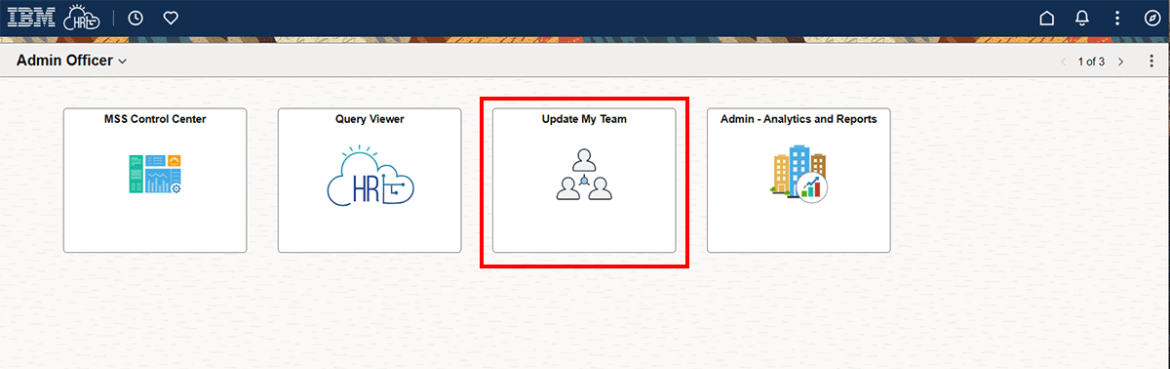
  1. Click Update My Team tile

     Screenshot showing Update My Team tile highlighted in red.
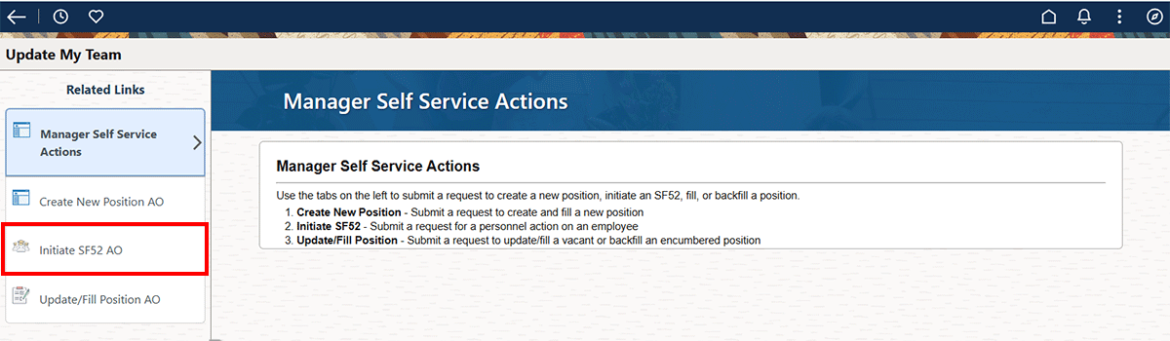
  2. Click Initiate SF52 AO

     Screenshot showing Initiate SP%@Q-AO highlighted in red in the right hand column.
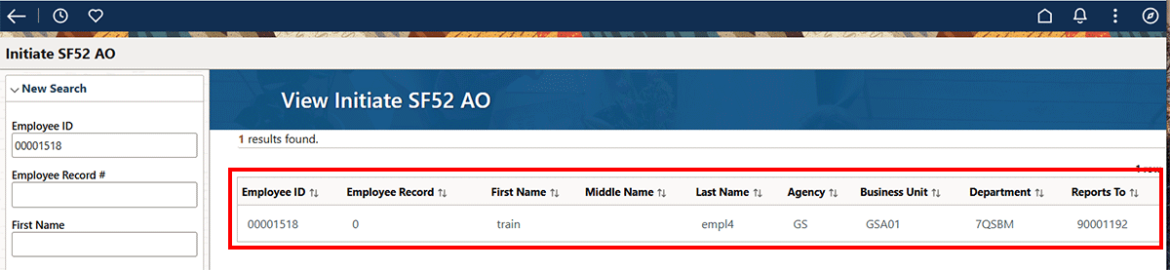
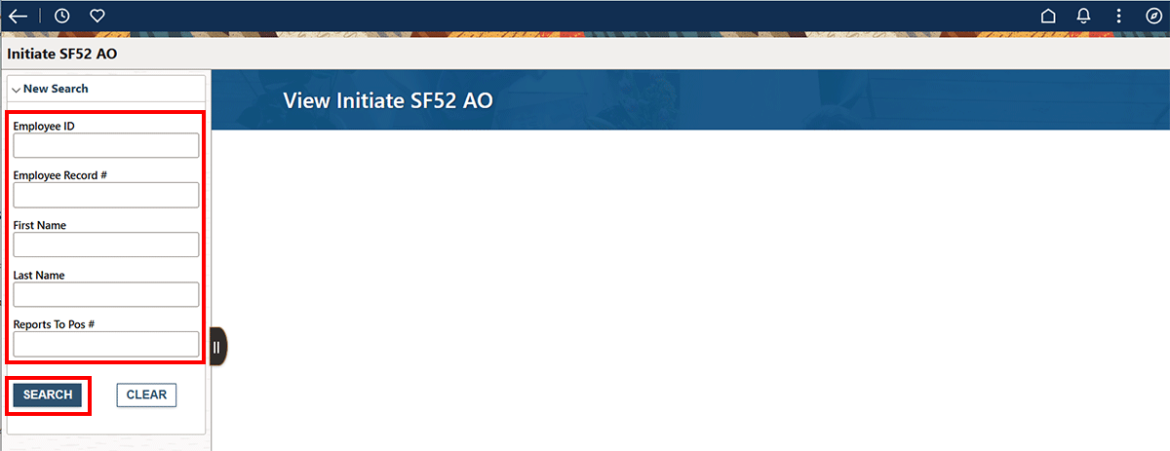
  3. Search for employee by ID or by employee first and/or last name. If you search by name and it has a hyphen or a space, you will need to use the wildcard %.

     Screenshot showing the employee fields in the left hand column highlighted in red.
  4. Click anywhere on the search result to go to the next page. 

     Screenshot showing the search results highlighted in red.
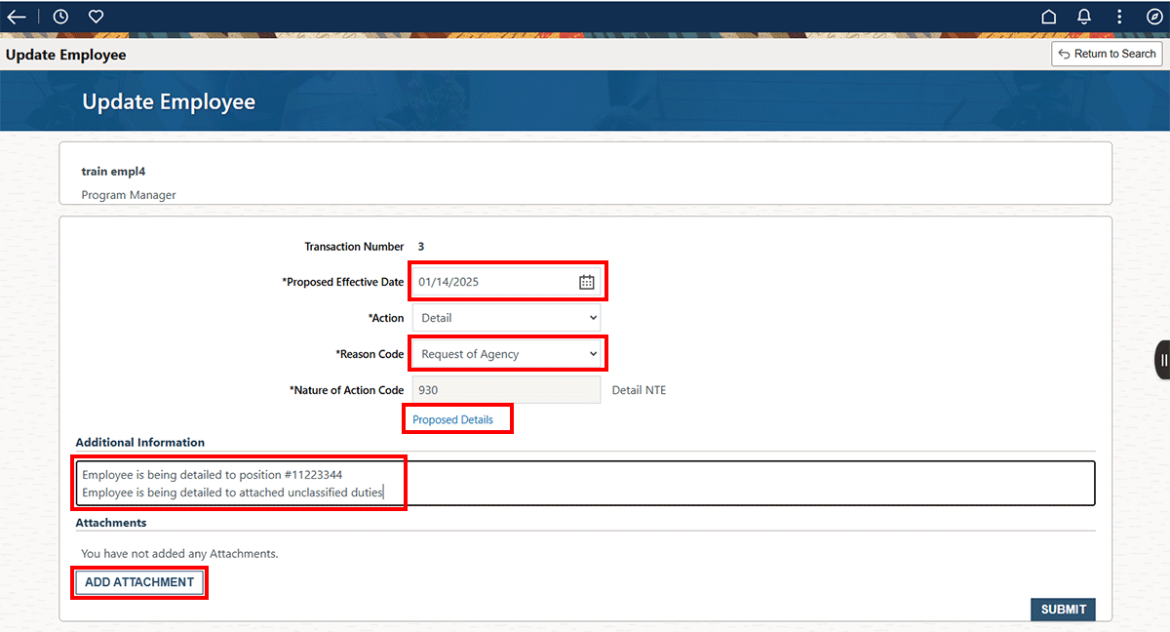
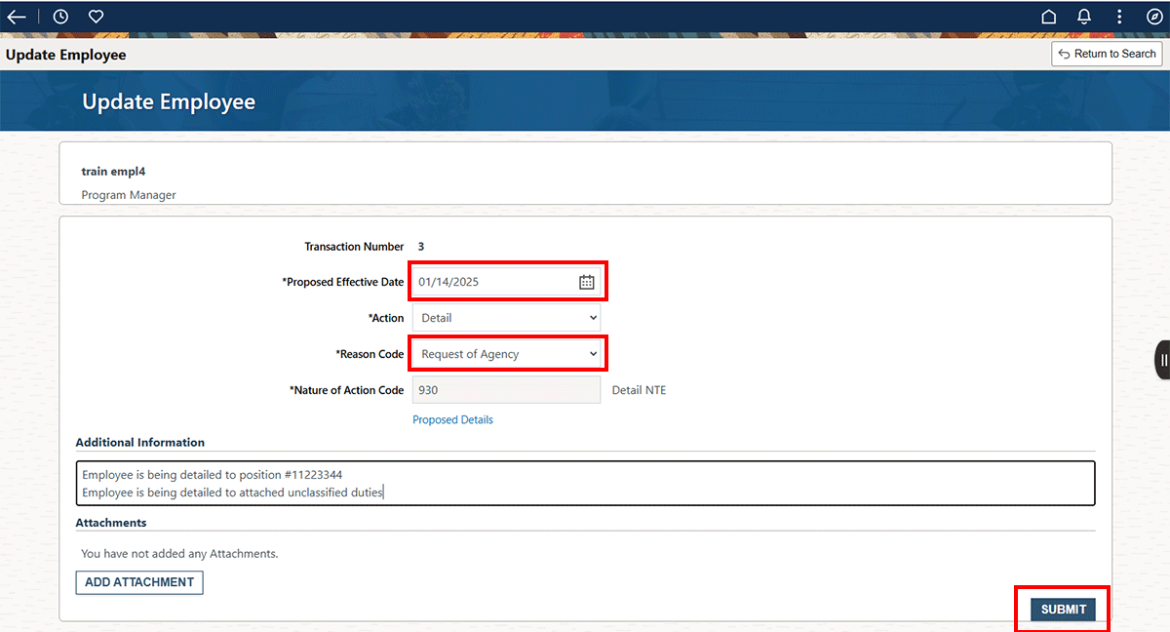
  5. Fill in as shown below. 
    Proposed effective date: a future date, the beginning of the detail.
    Action: Detail
    Reason code: Request of Agency
    Additional information: Always tell us the detail position number. If this is to unclassified duties, note it here and attach those duties. Extra information is always helpful. You have unlimited space so please explain in full.
    Add attachment: If needed, use this button to attach unclassified duties. 
    Click on the Proposed Details. You will not be able to proceed if you do not click on this link and fill in a Not-to-Exceed date on the next screen. 

    Screenshot showing the Update Employee fields including effective date, reason code, additional information, et al highlighted in red.
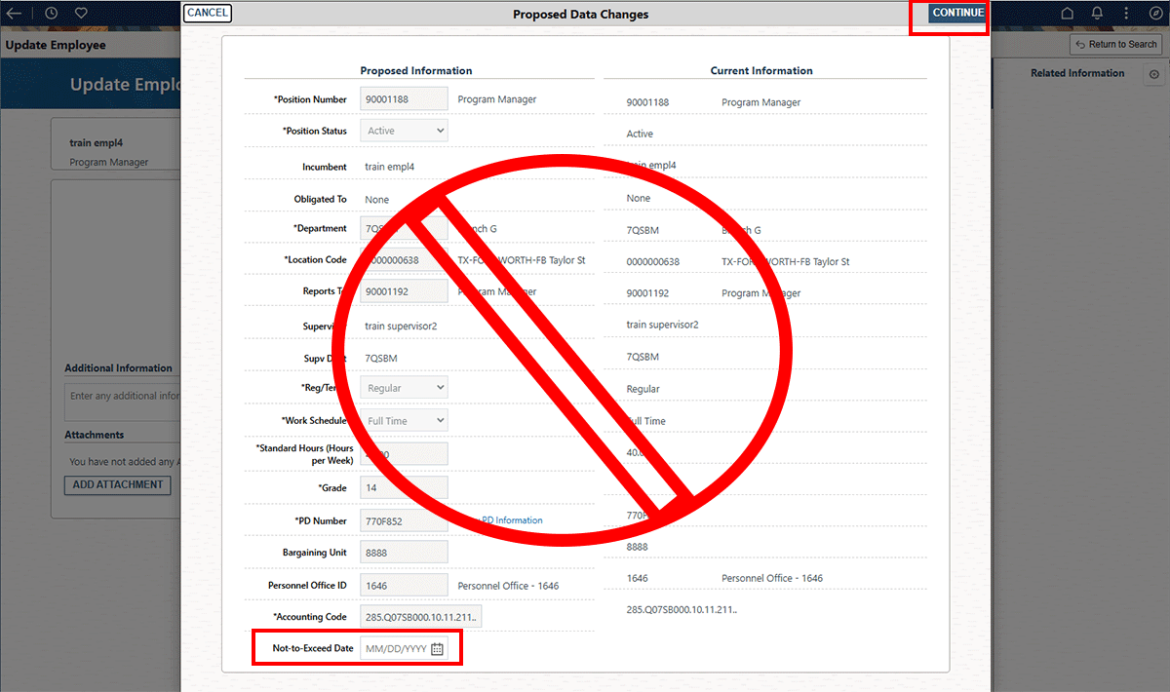
  6. On this screen fill in the Not-to-exceed Date ONLY. The latest update prevents you from accidentally updating these fields. Click Continue

     Screenshot showing Proposed Data Changes popup with the Not to Exceed Date field highlighted in red.
  7. Select the Submit button.
    • If the manager just tells you 120 days, use this calculator to figure out the right date to use.
    • If there are “unclassified duties”, you will need to attach them to the Detail action.  Unclassified duties cannot be used for supervisory positions. You need an actual PD# for supervisory positions.
    • We should only use GS1DET if the detailee is going to another agency .
    • Additional Comments are always welcome. Adding information such as: “Employee will be filling in for James Smith while he is on military leave” is helpful in ensuring HR processing your action correctly.
    • If you submitted the action using the correct position number, the detailee’s manager will have access to their timecard and if this is a supervisory position, they will have access to their employee’s timecards. Matrix teams will not be necessary. Note that performance plans stay with the previous manager unless they are manually moved by either the SSO Admin or the ER Specialist. This is true in all cases, even for permanent reassignments or promotions.
    • If the detail is to be extended fill in as follows:
    • You will need to attach an approval if this is over 120 days.

       Screenshot showing Update employee screen with Proposed effective date, reason code and Submit button highighted in red.
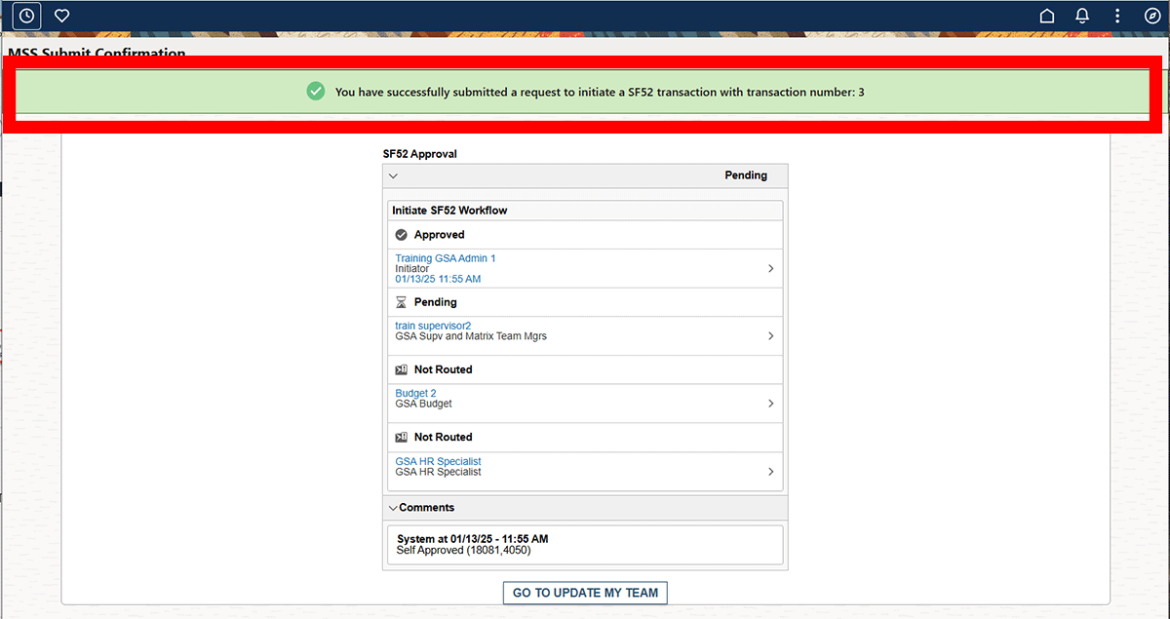
  8. Termination of Detail- This is not optional. You always need to submit a Termination of Detail for any employee placed on a detail. Submit it about 2 weeks prior to the termination date. Simply fill in the 3 items shown and click on Submit.

     Screenshot showing confirmation message highlighted in red.

Reimbursable Details-A Detail PAR does not update the appropriation code (accounting code). For guidance on reimbursable details, consult your Budget point of contact.

Print Page Email Page
Last updated: May 2, 2025
Top

Home

  • Resources for …
    • Americans with Disabilities
    • Citizens and Consumers
    • Federal Employees
    • GSA Employees
    • Native American affairs
    • Presidential & Congressional Commissions, Boards or Small Agencies
    • Small Business
  • Governmentwide Initiatives
    • Centers of Excellence
    • Digital experience
    • Emergency response
    • Federal Cybersecurity
    • ID, Credentials, and Access Management
    • Information Quality
    • Open Data
    • Technology Modernization Fund
  • Contact Us
  • Organization
    • Leadership Directory
    • Staff Directory
  • References
    • Annual reports
    • Plain Language
    • Budget and Performance
    • Catalogs
    • Orders & Directives
    • Forms
  • Website Information
    • A-Z Index
    • Report a website issue
    • Sitemap
  • Also of Interest
    • Data.gov
    • Whitehouse.gov
  • Tools
    • eBuy
    • eLibrary
    • Contracting forecast tool
    • GSA Advantage
    • GSA Auctions
GSA logo
  • Facebook
  • X
  • LinkedIn
  • YouTube
  • instagram
  • Blog
  • email

JOIN THE CONVERSATION

GSA.gov

An official website of the U.S. General Services Administration
  • Accessibility statement
  • Website Policies
  • Reports
  • Office of the Inspector General
  • No FEAR Act
  • FOIA Requests
  • Board of Contract Appeals
Looking for U.S. government information and services?
Visit USA.gov

PER DIEM LOOK-UP

1 Choose a location

Error, The Per Diem API is not responding. Please try again later.

No results could be found for the location you've entered.

Get my location

OR

OR

Rates for Alaska, Hawaii, and U.S. territories and possessions are set by the Department of Defense.

Rates for foreign countries are set by the Department of State.

2 Choose a date


OR

Rates are available between 10/1/2023 and 09/30/2026.

The End Date of your trip can not occur before the Start Date.


Additional terms and conditions

Traveler reimbursement is based on the location of the work activities and not the accommodations, unless lodging is not available at the work activity, then the agency may authorize the rate where lodging is obtained.

Unless otherwise specified, the per diem locality is defined as "all locations within, or entirely surrounded by, the corporate limits of the key city, including independent entities located within those boundaries."

Per diem localities with county definitions shall include"all locations within, or entirely surrounded by, the corporate limits of the key city as well as the boundaries of the listed counties, including independent entities located within the boundaries of the key city and the listed counties (unless otherwise listed separately)."

When a military installation or Government - related facility(whether or not specifically named) is located partially within more than one city or county boundary, the applicable per diem rate for the entire installation or facility is the higher of the rates which apply to the cities and / or counties, even though part(s) of such activities may be located outside the defined per diem locality.