An official website of the United States government
Here’s how you know
Official websites use .gov
A .gov website belongs to an official government organization in the United States.
Secure .gov websites use HTTPS
A lock
()
or https:// means you’ve safely connected to the .gov website. Share sensitive information only on official, secure websites.
Expand all accordions so you may use CTRL+F to search for a particular term or text string.
Lighting accounts for more than 30% of the total electricity consumption of commercial buildings in the United States.1 Effective lighting systems involve the integration of lighting technologies with the building as a whole — across the lifecycle of a building. Green technologies and design strategies are more conducive to energy and financial savings, human health, productivity, and satisfaction.
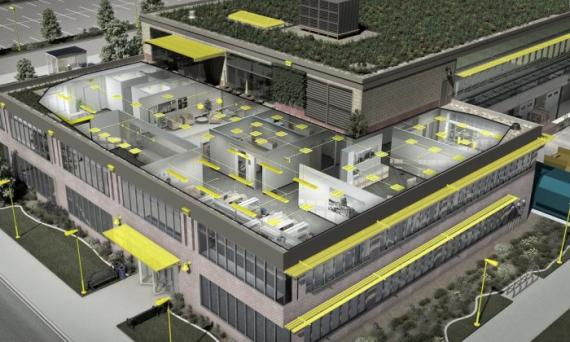
Exterior lighting typically serves one or more of the following purposes: aesthetics, security, or utility. Facade, parking, and walkway lighting present a tremendous opportunity for savings, as these lights are on for nearly half the year. Exterior lighting may also be known as outdoor lighting. Though the terms may be used interchangeably, exterior lighting may refer specifically to light fixtures that are mounted on the exterior of a building or integrated into a building’s architecture, while outdoor lighting may be used more broadly to describe any light fixtures located in outdoor spaces, such as streets, parks, and parking lots. Exterior lighting should be downward facing to limit light pollution and designed to reduce light trespass. Reflectors, deflectors, and covers can be used to maximize the efficiency of the light source. Exterior lighting systems, coupled with lighting controls such as motion detectors and photosensors, ensure an energy efficient and safe area beyond the building facade. LED lighting lasts longer and uses less energy than other lamp types, such as incandescent, fluorescent, or HID. Learn more about lighting by exploring guidance on selecting the most cost-effective and energy-efficient lighting systems [PDF - 9 MB] and for large-scale community projects, see DOE Better Building’s outdoor lighting accelerator toolkit.
The building characteristic that has the most significant impact on workplace lighting is fenestration, the arrangement of windows and doors on the elevations of the building. This should be considered in the lighting ecosystem when developing a strategy to optimize daylighting. This includes horizontal and vertical orientation of windows, as well as their placement, size, spacing, and quantity. Fenestration must be designed in such a way as to avoid direct sunlight on task surfaces or into occupants’ eyes.
Design considerations include:
Vertically oriented fenestration may allow greater daylight penetration and quality views to the outdoors.
High daylight illumination levels may correlate to incidence of glare.
Daylight penetration influences heating and cooling loads.
Limited daylight penetration may correspond to a greater reliance on electric lighting solutions and higher energy consumption, as well as limiting the psychological benefits of daylight.
Degree of transparency to the outdoors should be aligned to organizational mission and security requirements.
Glare, or excessive brightness within the field of view, is an aspect of daylighting that can cause discomfort and eye strain to occupants. It is important to reduce glare and avoid direct sunlight on task surfaces. Incorporate shading devices and window glazing technologies to keep work environments healthy and productive. Strategies include:
Roof overhangs — permanent shading that can help eliminate harsh high-angle summer sunlight
Exterior shading — permanent shading designed to reduce direct summer sunlight and glare
Exterior scrim — a shading device that can soften harsh direct sunlight
Interior window blinds or shades — a variety of blind or shade options either incorporated between window glass layers or attached to interior window frames to provide occupants with glare control. These options can be manual or automated.
Window coatings — selective coatings that reduce summer heat gain and glare but allow maximum sunlight penetration in winter are most effective when coupled with interior window blinds or shades
System relationships:
HVAC
Manual or automated window blinds or shades manage light entering the space and can help keep spaces cool in the summer, reducing the load on cooling systems.
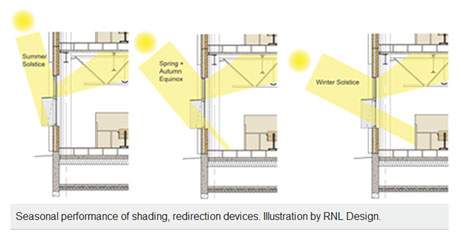
Roof overhangs and exterior shading can be positioned such that light is blocked in the summer, when the sun is overhead, and admit light and heat in the winter, when the sun is lower on the horizon, to reduce cooling loads and to provide free supplemental heating.
IEQ
Manual window blinds or shades give occupants control over how much daylight enters their spaces.
Window coatings, blinds, and shading help prevent uncomfortable glare within the space.
Automated blinds or shading systems should be properly maintained to prevent them from drifting out of spec and causing over-shading.
Emergency lighting is critical to any building design and can be designed for minimal energy use. Emergency light fixtures are battery powered and automatically turn on if there is a loss of power to the space, illuminating pathways toward exits. Lighted exit signs have a battery backup or are connected to emergency systems that supply power during an outage. Self-luminous exit signs emit a constant glow without requiring electricity or batteries. Retrofit kits convert lighted exit signs from incandescent-type lamps to LED. For guidance on selecting the most cost-effective and energy-efficient lighting systems available, see our LED lighting and controls guidance [PDF - 9 MB].
System relationships:
HVAC
LED exit signs give off less heat than older incandescent-lit signs, which can reduce the load on cooling systems in warm climates and save energy.
Interior
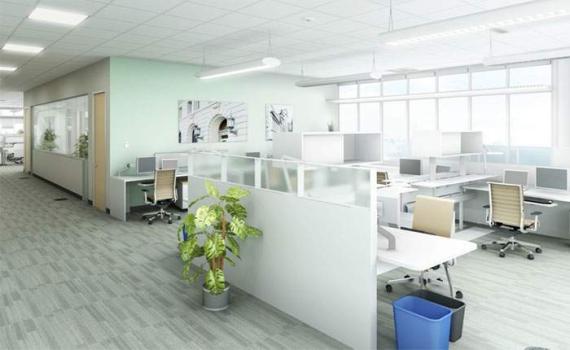
The lighting system plays a significant role in the overall indoor environmental quality of the office space.2,3 General lighting is designed to provide a substantially uniform level of illuminance throughout an area, exclusive of any provision for special local requirements.4 General lighting selection should be driven by efficiency, lamp life, color quality of the light, and its intended use with a combination of direct and indirect light sources. The ceiling layout impacts the effectiveness of a general lighting scheme. Use a non-uniform lighting layout to give more visual stimulation and appeal, supplemented as appropriate with daylighting, task lighting and accent lighting.
Optimizing daylighting and providing views to the outdoors has been demonstrated to increase occupant performance and reduce absenteeism.5 Integration of shading and glare control strategies avoids eye strain while individual lighting controls and task lighting gives occupants the ability to control their lighting conditions.
Task lighting is directed to a specific surface or area, providing illumination for visual tasks.4 In the office environment, providing task lighting at individual workstations and desks allows occupants control of their visual space and could reduce the need for general lighting.
Accent lighting is directional lighting to emphasize a particular object or surface feature, or to draw attention to a part of the field of view.4 Selective illumination, often located in entrance and lobby areas, can improve wayfinding, add brightness, create dramatic effects, and highlight points of visual interest.
Lighting system components are lamps; fixtures—reflectors, diffusers, and lenses; ballasts — for some types of lamps, and controls. Light emitting diode or LED lamps have become common in most workplace environments, but fluorescent and high-intensity discharge or HID lamps may be preferred for certain applications. Consider the lamp, fixture, and appropriate controls, as well as ceiling, floor, and wall surface reflectance values, to maximize light levels while minimizing energy consumption.
Choosing the most efficient lamp and appropriate control minimizes the amount of waste heat generated, allowing the cooling system to run more efficiently.
LED lamps use less energy than other types of lamps. If replacing an older cooling system, you may be able to purchase a smaller, less expensive chiller and air distribution system.
IEQ
Lower general lighting levels, combined with task lighting, can adequately illuminate writing and reading tasks while limiting excessive brightness on computer screens.
General lighting fixtures can be selected to reduce glare and diffuse light, limiting direct brightness on work surfaces and computer screens.
Provide accent lighting on walls to avoid shadows that can make a space appear dreary or enclosed.
Unevenly distributed light on work surfaces can create too much contrast for work tasks and cause eye strain.
Daylighting uses light originating from the sun as a substitute for electrical lighting. The best proven lighting strategy is to employ layers of light — using daylight for basic ambient light levels while providing occupants with additional lighting options to meet their needs.
An effective daylighting strategy appropriately illuminates the building space, through side-lighting and top-lighting apertures such as windows and skylights, without subjecting occupants to glare or major variations in lighting levels. Daylight can be reflected into the interior of the space using light shelves at the building’s perimeter or light tubes from the roof. Daylighting can reduce energy consumption from lighting and provide a visually stimulating and productive environment for occupants.
Daylighting analysis:
A critical first step to optimizing the benefits of daylight, including to occupants’ circadian rhythms, is understanding daylighting conditions. A daylighting analysis is a simulation of daylight levels within a space at various times of the day and year and can inform the placement and size of windows and skylights in new construction projects, as well as the treatment of windows, use of space, design of electric lighting systems, placement of furniture and selection of colors and finishes in any project. A daylighting analysis using lighting simulation software can simulate daylight illuminance levels and patterns, model how to integrate electric lighting based on available daylight, identify when and where glare may need to be controlled, and estimate energy savings. Daylighting analyses are best conducted by a professional lighting consultant as early as possible in the design process.
Integrating daylighting with electric lighting and controls:
Daylight-responsive lighting controls are an essential component of any daylighting strategy. Photosensor controls that adjust the level of electric lighting according to the amount of daylight available will yield the greatest benefit. Switching controls turn some or all of the electric lighting off when there is sufficient daylight. Dimming controls modulate the electric lighting depending on the available level of daylight.
Operation and maintenance:
Key to the success of an effective daylighting strategy is the education and engagement of occupants and operations and maintenance personnel. Commissioning is important to ensure that the daylighting controls and electric lighting are properly installed and configured. Occupants should be educated about acceptable levels and benefits of daylight and the features of the daylighting strategy. This not only contributes to occupant comfort but empowers occupants to be advocates for the proper operation of the lighting system and controls. Operations and maintenance personnel must be educated about all aspects and components of the daylighting strategy and how to continually evaluate the system’s performance, as well as trained on the functionality and maintenance requirements of the electric lighting and controls.
System relationships:
HVAC
Minimize heating and cooling loads by considering climate conditions, glazing selection, and the placement of windows and skylights. Poorly implemented daylighting techniques can lead to overheating of a space and an increase in cooling loads.
Reflective coatings on windows can reduce heat gain in the summer.
Glass has a lower insulation value than other building components, allowing a higher rate of heat transfer to the outdoors. Be sure to specify windows with higher insulation values, which may include those with double- or triple-paned glass.
Windows and skylights with integral blinds or shades offer some maintenance benefits but can cost more and may have a lower insulation value.
IEQ
Optimized daylighting and access to quality views to the outdoors can contribute to occupant satisfaction and psychological comfort which may enhance occupant performance and reduce absenteeism in some circumstances. Allowing daylight into the space while simultaneously providing individualization and acoustical privacy can be accomplished with partially translucent interior walls.
Provide occupants seated near windows glare control integrated into the daylighting strategy.
Surface reflectance, or light reflectance value, is a measurement of how much visible light, on a scale from 0% to 100%, is reflected off of a surface when that surface is illuminated by a light source. Walls, ceilings, and furniture surfaces should be of light color, high surface reflectance, and low glare. Maximizing surface reflectance avoids high contrast for visual tasks and reduces the output required of the lighting system, making the space more visually comfortable, economical, and energy efficient.
System relationships:
IEQ
A brighter interior environment can contribute to occupant satisfaction and psychological comfort, which may enhance occupant performance and reduce absenteeism in some circumstances.
Lighting controls can be used to manually or automatically turn lights on and off or control lighting levels according to daylight conditions. Lighting controls are critical for minimizing energy use and maximizing space functionality and occupant satisfaction. Common types of lighting controls include manual controls like switches and dimmers and automated controls such as vacancy sensors, occupancy sensors, photosensors, dimmers, and timers. In addition to controlling general lighting, sensors are useful for task lighting, such as under-shelf workstation lighting, and exterior lighting applications.
Vacancy sensors — Vacancy sensors detect activity within a space and turn lights off automatically when the space is unoccupied. Occupants are required to manually turn on lights. Vacancy sensors are effective at improving the lighting system’s energy efficiency.
Occupancy sensors — Like vacancy sensors, occupancy sensors detect activity within a space. However, occupancy sensors both turn lights on automatically when the space is occupied and turn lights off when the space is unoccupied. There are two types of occupancy sensors:
Ultrasonic sensors detect occupancy through changes in sound waves that are distributed by motion. This is most effective in applications where there is limited line of sight to the sensor and less concern about reading outside the space, e.g. restrooms and rooms with obstructions.
Infrared sensors detect occupancy through changes in heat distribution within the space based on motion, e.g. offices and most general activity spaces. This technology can also be directed to specific areas of a space to help eliminate false readings.
Photosensors — Photosensors detect daylight and adjust electric light accordingly. Vital for outdoor applications, photosensors ensure that the exterior lighting system is functioning at night when needed, but turned off during daylight hours. Photosensors within the interior of the building can be used to turn off or dim electric lighting in response to sufficient levels of daylight.
Dimmers — Dimmers provide variable levels of light, which can save energy by reducing wattage.
Fluorescent lamps may require special dimming ballasts, but dimming can be effective at reducing energy use.
LED lamps can be used with dimmers but must be designed for dimming.
Timers — Timers can be programmed to turn on and off both indoor and exterior lights at specified times. Timers, paired with other lighting control technologies, can be effective in ensuring that lighting is not on when it is not needed.
Motion sensors and timers can help reduce waste heat generated from lighting, reducing the load on the cooling system.
IEQ
Occupancy sensors with manual overrides give occupants control over lighting in their spaces.
Where manual or automated dimmers are used to improve the quality of the lighted space, be sure to choose lamps designed to work with dimmers and dimmers that are compatible with the specified technology.
Furniture placement, dimensions and orientation have a significant impact on the effectiveness of general lighting. A daylight-optimized interior design considers furniture design, placement, and finishes to enhance lighting performance. For example, position work surfaces at a distance from windows that reduces the need for shading and may permit greater penetration of daylight but maximizes views to the outdoors. Choose finishes that reflect light diffusely (low gloss) to avoid causing glare. Locating private offices away from windows, toward the center of the building, and using transparent or translucent panels can optimize views and daylight for all occupants.
For example, by positioning work surfaces at a distance from the south facade, solar control is easier with smaller solar shading devices than if a desk or office is placed directly against the south facade. This concept is illustrated in the following figure and shows how a relatively small overhang provides full direct seasonal solar protection to the workspace. The area immediately adjacent to the south facade is circulation space.
Furniture and furnishings directly affect the ergonomics of the workspace. Adjustable furniture and furnishings, including work surfaces, seating and lighting, accommodate user preferences and maximize comfort.
To reduce occupant discomfort, avoid high-gloss, high-contrast finishes on furniture.
Task lighting is directed to a specific surface or area, providing illumination for visual tasks.6 In the office environment, providing task lighting at individual workstations and desks allows occupants control of their visual environment and could reduce the need for general lighting. Case studies have measured occupant comfort improvements between 10% and 16% with adjustable task lighting.7 Task lighting can come hard-wired in furniture or be as simple as a desk lamp. LED lamps and fixtures with articulated arms maximize energy savings and positive ergonomics. Consider controlling task lighting with occupancy sensors to avoid lights being left on when space is unoccupied.
Task lighting is often closer to the work surface, allowing for reduced-power (and reduced heat) general lighting.
IEQ
Allowing occupant control over the immediate lighting in the workspace offers beneficial human impacts such as increased comfort and performance.
Lobby
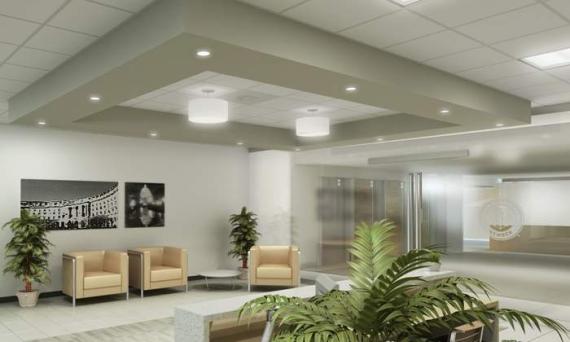
Accent lighting is directional lighting to emphasize a particular object or surface feature, or to draw attention to a part of the field of view.8 Selective illumination, often located in entrance and lobby areas, can improve wayfinding, add brightness, create dramatic effects, and highlight points of visual interest. To manage energy use, utilize accent lighting to the minimal extent possible while still achieving desired aesthetic effects. For high-ceiling applications where bulb replacement is particularly challenging, consider long-life LED lighting strategies to minimize maintenance cost.
Traveler reimbursement is based on the location of the work activities and not the accommodations,
unless lodging is not available at the work activity, then the agency may authorize the rate where
lodging is obtained.
Unless otherwise specified, the per diem locality is defined as "all locations within, or entirely
surrounded by, the corporate limits of the key city, including independent entities located within
those boundaries."
Per diem localities with county definitions shall include"all locations within, or entirely
surrounded by, the corporate limits of the key city as well as the boundaries of the listed counties,
including independent entities located within the boundaries of the key city and the listed counties
(unless otherwise listed separately)."
When a military installation or Government - related facility(whether or not specifically named) is
located partially within more than one city or county boundary, the applicable per diem rate for the
entire installation or facility is the higher of the rates which apply to the cities and / or counties,
even though part(s) of such activities may be located outside the defined per diem locality.


 U.S. General Services Administration