This toolkit helps Contracting Officer Representatives, or CORs, understand and navigate each step of the Public Building Service, or PBS, Assisted Acquisition process, while leveraging our standardized workflows and digital systems.
Use this toolkit as a living guide throughout the lifecycle of your project. It is managed by the PBS policy team.
Who’s involved
Before we begin, learn the key stakeholders you will collaborate with throughout the acquisition process:
- You are the COR from the customer agency.
- Customer agency representatives are the other program or budget staff within your agency.
- CO is the contracting officer who manages procurement actions and awards.
- RWA team is comprised of our reimbursable work authorization experts.
- EASi award team is comprised of those who support the award and management of contracts in the PBS contract writing system.
Training and workflow
To support you in your role, our Agency COR training will walk through the full acquisition lifecycle while reinforcing your role at each step.
Key systems
You will interact with these essential systems during your work with us:
- Procurement Request Submission Tool
This tool is your starting point for initiating a new requirement with GSA or initiating a modification to an award that is administered by GSA. However, if your agency has facilities or construction type work, you will go directly to eRETA. - eRETA — Reimbursable Work Request and Tracking Application
This system is used to create and track work requests, and is required for initial submission and option exercises, especially for facilities or construction type work.
Funding considerations
When it comes to funding, remember the following:
- Subject to availability of funds, or SAF: We cannot begin work or obligate funding under SAF clauses. For this reason, your period of performance, or PoP, should not begin on October 1, the start of the fiscal year, unless full funding is already in place.
- Incremental funding: If your project will be funded in phases, the initial work request, or WR, should reflect this. Additional funding can be added later through a modification.
Acquisition roadmap
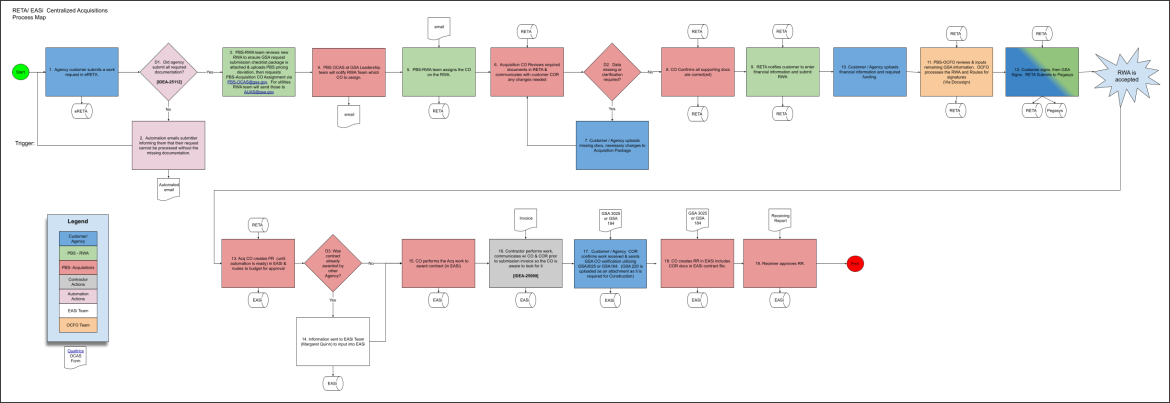
Build the acquisition package
You are required to complete and attach the following documentation to the RWA:
- SOW/PWS/specifications
- Inherently governmental determination
- Any drawings, studies, program requirements or restrictions, environmental safety and compliance documentation
- IGCE with information on how it was developed, i.e., historical, recent awards, etc.
- Draft project milestones schedule
- Signed COI/NDA
- COR nomination letter — template
- COR certificate
The CO will communicate any changes needed to the acquisition package.
To learn more about documentation on different types of purchase requests, reference the purchase request submission checklist.
To understand specific package requirements and timelines, reference the procurement acquisition lead times, or PALT, resource.
Submit the initial request
- As the Agency COR, you will use eRETA to enter a work request
- Identify action as either:
- PBS — Nonseverable projects
- This includes new construction, buildout and alterations, workplace engagement and studies, design and construction management services, move services, IT/security installation, and furniture and other fixtures
- PBS — Severable projects
- This includes cleaning and janitorial, maintenance, landscaping, and overtime utilities, and requires customers to provide the contract documents
- Upload all required documentation and submit
- GSA CO is assigned
For incremental or option year funding, modify your existing RWA.
Manage the awarded contract
You must maintain regular and open lines of communication with the CO. Specifically, the CO will:
- Award the contract in EASi
- Share award details with Agency COR
As the Agency COR, you will:
- Monitor contractor performance
- Report performance issues
- Confirm work completion
- Provide the CO all COR contract file documentation throughout the life of the contract
- Contract file documentation management
- Documentation can also be provided utilizing our ECF tool
- Use the following examples when submitting various documentation:
- 37 — COR pre-award administration
- 38 — COR budget/funding
- 39 — COR design documents
- 40 — COR contract documentation
- 41 — COR security badging and escorting documentation
- 42 — COR submittals
- 43 — COR correspondence
- 44 — COR invoicing and inspection reports
- 45 — COR project close out
- Use File naming best practices
- Begin with descriptive content narrative
- Include form number if applicable
- Use capital letters or spaces to differentiate each word
- Use YYYY MM DD date format
- Avoid symbols
- Do not use “final” in the filename unless it is truly the final submission
Manage invoices and receiving reports
Here are the required COR actions for managing invoices:
- Request a pencil invoice — this is a draft copy that allows you to:
- Review for accuracy before it enters GSA’s payment system
- Catch mistakes early and have them fixed before the formal submission
- Once the contractor submits the official invoice, you will receive an automated email notification that it has been received. It will include important details like:
- Vendor name
- Contract number and PDN
- Contracting Officer’s email
Keep this email handy — you’ll need the information when you complete the required forms.
- Review the invoice
- Confirm the work or products were completed and received
- Ensure the work or products match the contract’s scope of work
- Identify which contract line item number, or CLIN, or sub-CLIN covers the work
- Verify there is enough funding on that CLIN/Sub-CLIN to pay the invoice
- Complete the required form(s)
- Services or one-time construction payments GSA3025
- Construction: GSA184 and GSA220
Make sure the forms are fully filled out and signed by you, as the COR.
- Communicate with your CO
- If approving the invoice:
- If rejecting the invoice:
- Tell your CO right away and explain the reason for rejection
- The CO will formally reject it in the system
For training on receiving reports, follow our instructions for external COR’s.
Exercise option years
To exercise an option year on your contract, if applicable, you should start with our Procurement Request Submission Tool, then submit your request through eRETA. Additionally, ensure you have the following required documents to exercise an option year:
- Option memo
- Notice of intent to exercise an option
Success tips for CORs
- Communicate regularly with your CO.
- Thoroughly review all of your documentation.
- Ensure you keep all detailed documentation, and make sure it’s organized.


 U.S. General Services Administration
![Download full resolution [PNG - 181 KB]](https://origin-www.gsa.gov/system/files/flowchart-PBS_Centralized_Acq_Process2-2440x840.png)